Editorial calendar
A WordPress editorial calendar your whole desk can plan around
See every scheduled story and every draft in one view, drag things to a new day when plans change, and stop discovering on Thursday that Friday is empty.
Plan
Week and month views, as far ahead as you need
The calendar shows your content across a date range you choose, six weeks by default and up to twelve. Click a title to see its details, or use the filters to narrow the view to what matters to you today.
- Filter by status or by post type
- Your filters are saved per user, so the calendar opens the way you left it
- Each entry carries the icon its post type registered, so a page and a post never look alike
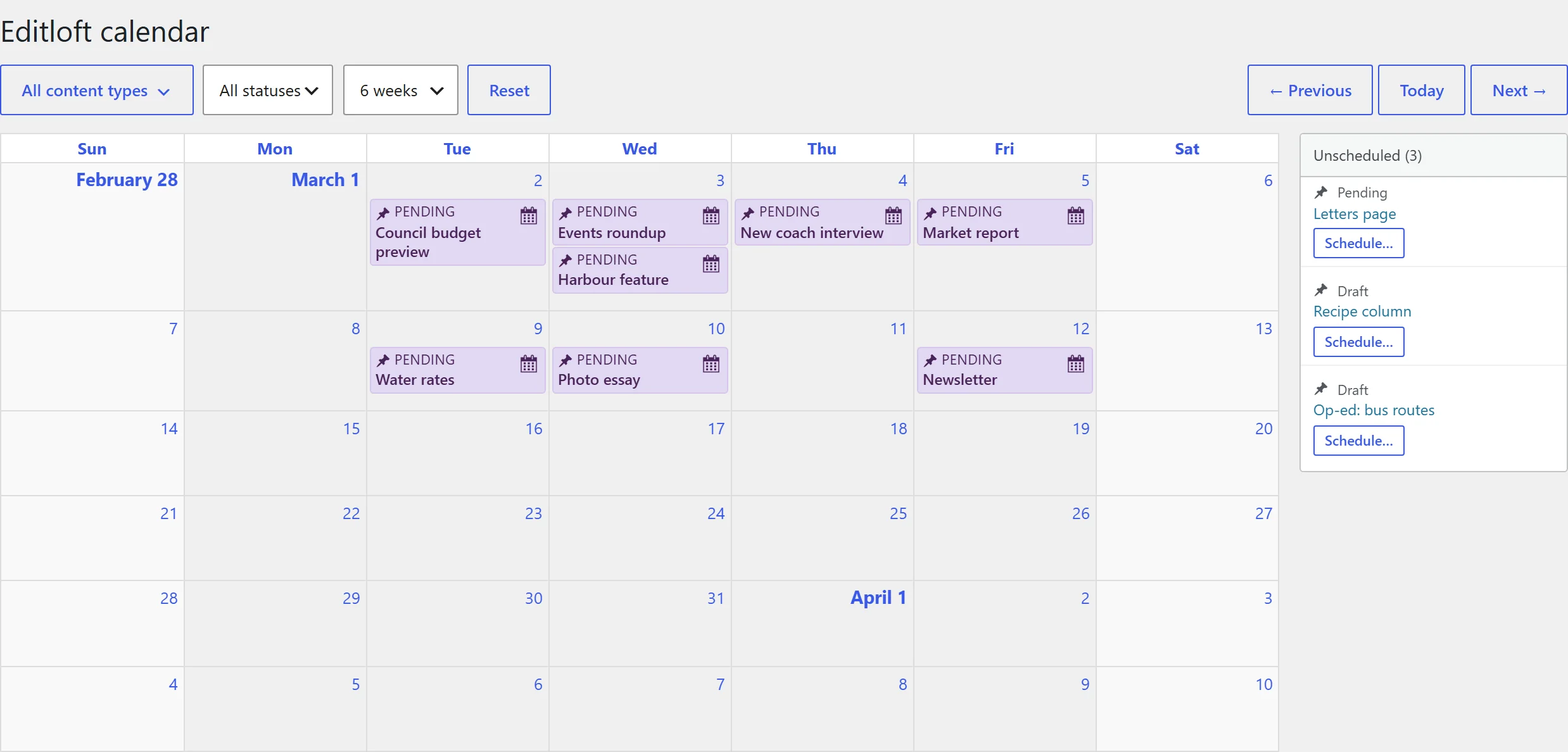
Schedule
Drag a story to another day
Grab a scheduled story and drop it on a new day. Its publish date follows the move, and the change is recorded in the audit trail with the word Calendar beside it.
- Only the people allowed to edit a post can move it
- Published posts are protected: the calendar asks you to edit them instead of moving them
- Dragging a draft back to the side panel unschedules it. A scheduled post cannot be dropped on a past day or into the side panel
- Prefer the keyboard or a touchscreen? Each entry has a "Move to another date" button and each unscheduled draft a "Schedule" button. Both open one dialog with a date field
- Undo puts the post back on the date it had before. Success messages are announced to screen readers, and errors stay until you dismiss them
- On a phone the side panel moves under the calendar and the grid scrolls sideways at a readable width
Unscheduled
Keep loose drafts out of the way
Drafts without a publish date wait in a side panel until you place them on a day. The panel lists only genuinely unscheduled posts, so a post with a real date stays on the grid and never appears in both places.
- Drag from the panel onto a day to schedule
- Icons and status colours stay with the entry as it moves
Subscribe
Subscribe with an iCal feed
The calendar can publish an iCal feed, so your editorial plan shows up in Apple Calendar, Google Calendar or any app that subscribes to an iCal link. The feed is off until you enable it, and the link is signed with HMAC-SHA256 and compared in constant time, so it cannot be guessed.
- Regenerate the secret whenever someone leaves the team, and every old link stops working
- Existing short secrets are replaced with a 32-character secret when you open the calendar settings
- Treat the link like a password: anyone who has it can read the titles and dates it lists
Questions
Editorial calendar FAQ
How do I schedule a WordPress post by dragging it on a calendar?
Open the Editloft calendar, then drag a scheduled story or a draft onto the day you want. Its publish date follows the move and the change is recorded in the audit trail.
Can I drag a published post to a new date?
No. Dragging is for posts that have not gone out yet. If you try to move a published post the calendar tells you to edit the post instead, which avoids changing the date of live content by accident.
Which post types appear on the calendar?
Any public post type. You can turn individual types off in the calendar settings after the first run, and each entry shows the icon its post type registered.
Who can see the calendar?
People with the view calendar capability, which is granted to roles from contributor up. You can change the requirement with the editloft_view_calendar_cap filter.
Is the calendar feed public?
No. It is off by default. When you enable it, the link carries a signed secret. Regenerate the secret from the calendar settings and every old link stops working.
Also in Editloft
More about the Editloft plugin
Audit trail
A record of every status change and date move, with the person and the path.
Read about the audit trail →Status transitions
Writers submit, editors publish, and the rules are yours to change.
See how the status rules work →For developers
REST, WP-CLI, filters and a test suite.
Read the developer notes →Free, open source, GPLv2
Try Editloft on a staging copy of your site
It is free, it takes a minute to install, and you can switch each module off again from one settings screen.