Drag-and-drop scheduling
Move a story to another day and its publish date follows. Published posts are protected from accidental moves.
Free WordPress editorial workflow plugin, a maintained Edit Flow fork
Editloft gives an editorial team three things WordPress does not: a calendar you can plan a week around, a record of every status change and date move, and rules about who may publish. It is small on purpose, and it is an Edit Flow alternative that works in the block editor.
Why teams use it
WordPress answers none of them out of the box. Editloft answers each with one module you can read in an afternoon.
The editorial calendar puts every scheduled story and unscheduled draft in one place.
Calendar →The audit trail records each status change and date move, with the person and the path.
Audit trail →Status transitions let writers submit for review while editors decide what goes out.
Status rules →Features
Move a story to another day and its publish date follows. Published posts are protected from accidental moves.
Drafts without a date wait in a side panel, so the calendar shows only what is really planned.
A signed iCal feed for Apple Calendar or Google Calendar. It is off until you turn it on.
Writers move work forward, editors and administrators decide what publishes, and you can change the rules.
Read any post's audit trail from a script or the command line. Scripted publishes are never blocked.
One settings screen turns each module on or off. Nothing loads that you did not ask for.
Editorial calendar
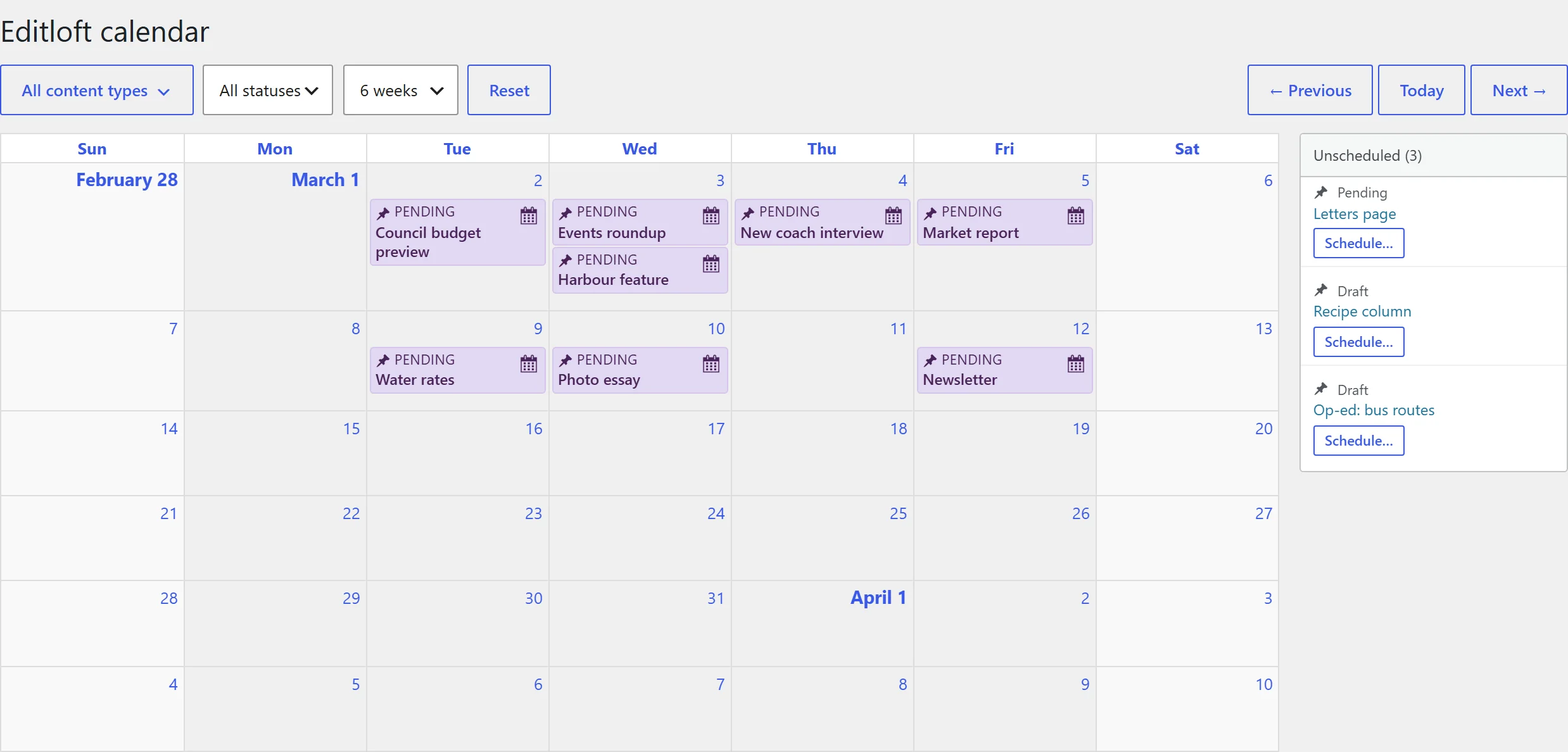
Every scheduled story and every draft on one calendar. Drag a story to a new day and the date changes with it. Drafts with no date wait in a side panel until you place them, and a post never appears in both places at once.
Illustration of the Editloft calendar: a two-week grid with sample stories coloured by status and a side panel of unscheduled drafts.
Audit trail
Every status change and date move is recorded with who made it and which path it came through: the editor, the calendar, WP-CLI or a scheduled publish. When someone asks why a story went live early, the answer is one click away.

Getting started
Download the zip from GitHub and upload it under Plugins, Add New Plugin. Activate it like any other plugin.
Open Editloft in the admin menu and switch on the calendar, the audit trail and the status rules you want. Each is independent.
Writers keep using the editor. Editors get the calendar and the rules. Nobody has to learn a new workflow.
Who it is for
Managing editors
One calendar for the whole week, with statuses you can read at a glance and drafts that are not yet scheduled kept apart.
Writers and contributors
Move a draft to pending review when it is ready. The editor sees it, and you never have to wonder whether you can publish.
Site owners
Only the roles you choose can publish, schedule or unpublish, and you can prove what happened afterwards.
Developers
A read-only REST field, a WP-CLI command and three filters. No hidden state, and a test suite you can run.
I ran newsroom-style publishing on WordPress for years. I wanted the small, sharp core back: the few things I used every day, rebuilt for current WordPress, with nothing to switch off on install.
Questions
Yes. It is licensed GPLv2 or later, the same license as Edit Flow. There is no paid tier, no licence key and no upsell inside the plugin.
For some teams. Editloft keeps the calendar and adds an audit trail and role-based status rules. It does not include custom post statuses, editorial comments, editorial metadata, notifications or a story budget. The comparison page lays out exactly what each one does.
WordPress 6.4 or newer and PHP 7.4 or newer. It works with the block editor and does not need any other plugin.
No. The plugin code makes no outbound requests and includes no analytics. The audit trail is stored in your own WordPress database. The privacy page has the detail.
Yes. Each module can be switched on or off from one settings screen, and the status rules can be changed with a single filter if your team works differently.
One person, in the open. I am Christopher Ross, and I use Editloft on my own sites and keep it working because I rely on it. It is not a supported commercial product, so I cannot promise a response time, but I read every issue.
More answers on the support page, or learn how to set up an editorial workflow in WordPress.
Recent releases
Every calendar entry now has a "Move to another date" button and every unscheduled draft a "Schedule" button, so you no longer have to drag, and every move can be undone. Filters apply as you change them and are remembered. Editors and administrators can publish and schedule without a 403 in the block editor, authors are offered Submit for Review instead of a Publish button that failed, and WP-CLI and scheduled publishes are no longer gated. A scheduled post dragged to a new day now moves the moment WordPress publishes it, and the audit trail reads in plain sentences with the newest ten changes first.
This build also carries the changes of an earlier same-day build, 0.6263.1854, which was never released as a download: the wp editloft audit <post_id> command, a 22-test PHPUnit suite that runs in CI, and a calendar feed link signed with HMAC-SHA256. The signing changed the link, so an old feed link stops working. Copy the new one from the Screen Options tab on the calendar page. The feed is off by default.
A REST filter registered without declaring its second argument ended every block-editor save in a fatal error. Quick Edit was unaffected, which made the bug look selective. It shipped in two earlier builds, so anyone on 0.6194.1016 or 0.6199.0938 should update.
The calendar grid now draws the icon each post type registered, so a page, a post and a custom type no longer look alike. Dashicons take the colour of the entry they sit in so they stay readable against every status.
Free, open source, GPLv2
It is free, it takes a minute to install, and you can switch each module off again from one settings screen.